Mini CSMS
SME OCPPSim has a built-in simple CSMS: a WebSocket server in the same process, with its own panel in the web UI. Use it to try the simulator without any backend (our chargers connect to our own CSMS), for demos, or to act as the CSMS for a real charging station under test.
It is deliberately small. It answers every message a station sends with a valid minimal response, records what it learns, and sends CALLs you type in a JSON editor or schedule in a plan. It has no database, no user management and no energy management logic.
Quick start
The demo config starts the Mini CSMS on ws://127.0.0.1:9000/ocpp and two chargers (OCPP 1.6 and
2.0.1) that connect to it. 30 seconds after each accepted BootNotification the plan sends a SetChargingProfile
(TxDefaultProfile, 3 kW) that then shows up in the charger's Smart Charging panel. Open Simulation → Mini CSMS
to see the stations.
--mini-csms, --csms-host and --csms-port switch it on or move it for one run without editing the config.
What it does
| Area | Behaviour |
|---|---|
| Versions | OCPP 1.6J and 2.0.1 (subprotocols ocpp1.6 / ocpp2.0.1); mini_csms.versions limits them |
| Subprotocol | The first subprotocol the station offers that is enabled. If none is, the handshake completes without Sec-WebSocket-Protocol and the connection is closed at once (code 1002); the refusal is listed in the panel |
| Station id | The last path segment of the URL: ws://host:9000/<anything>/<station id> |
| Security | Profile 0 (no authentication) or Profile 1 (HTTP Basic Auth, auth.basic: true). No TLS server: profiles 2 / 3 are not supported |
| BootNotification | boot.status (Accepted / Pending / Rejected) and boot.interval |
| Authorization | authorize.default, per tag overrides in authorize.tags (Authorize, StartTransaction, StopTransaction, TransactionEvent) |
| Transactions | 1.6 StartTransaction gets a transactionId from one counter; 2.0.1 TransactionEvent Started / Updated / Ended is tracked by its transactionId |
| Other actions | Every other CP → CSMS action of the version gets a valid minimal answer (see below); an unknown action gets CALLERROR NotImplemented |
| Tolerance | A payload that does not match the schema is answered anyway and recorded as a warning; strict: true answers it with CALLERROR instead |
| Reconnect | A station that connects again replaces its old connection |
Fixed answers that carry a decision: DataTransfer → UnknownVendorId, SignCertificate → Rejected (no CA),
2.0.1 Get15118EVCertificate / GetCertificateStatus → Failed, NotifyEVChargingNeeds → Rejected,
NotifyEVChargingSchedule → Accepted. All other answers are empty objects. Every answer is checked in the test
suite against the response schemas of the ocpp library.
The panel
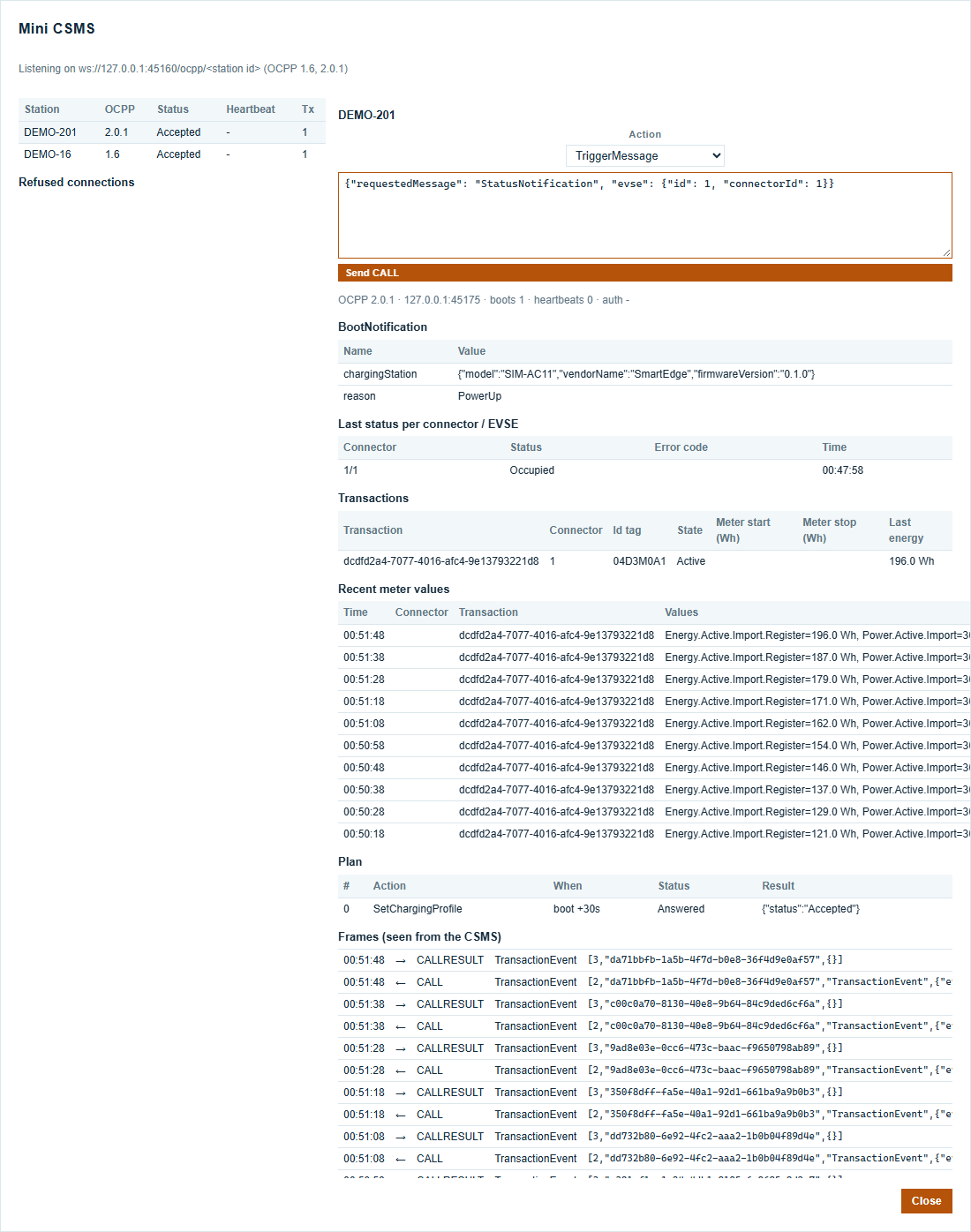
Simulation → Mini CSMS shows:
- the listen URL (or why it is not running) and the refused connections (wrong password, unknown subprotocol);
- the stations: version, boot status, last heartbeat, active transactions (the newest connection of each id stays listed after it disconnects);
- for the selected station: the BootNotification, the last status per connector / EVSE, the transactions, the newest meter values, the plan state, payload warnings and the frames as seen from the CSMS;
- the JSON editor: pick a CSMS → CP action, type the payload and send it. The payload is checked against the version's schema first; a mismatch is shown with the field and nothing is sent. The answer (CALLRESULT or CALLERROR) is shown below the editor.
Plan
mini_csms.plan lists CALLs that are sent automatically on every connection:
mini_csms:
  enabled: true
  plan:
    - at_s: 30              # seconds after the trigger
      after: boot           # boot = first Accepted BootNotification, connect = WebSocket connected
      ocpp_version: "1.6"   # only stations of this version (omit: every enabled version)
      charger: "CP-*"       # only matching station ids (omit: every station)
      action: SetChargingProfile
      payload:
        connectorId: 1
        csChargingProfiles:
          chargingProfileId: 1
          stackLevel: 0
          chargingProfilePurpose: TxDefaultProfile
          chargingProfileKind: Relative
          chargingSchedule:
            chargingRateUnit: W
            chargingSchedulePeriod: [{ startPeriod: 0, limit: 3000 }]
Payloads are written in wire form (camelCase) and checked against the schema when the configuration is loaded.
Without ocpp_version the payload must fit every enabled version, so version-specific actions need it. Each
item is sent once per connection; a reconnecting station runs the plan again.
Testing a real station
Set host: "0.0.0.0" (or --csms-host 0.0.0.0) and point the station at ws://<this PC>:9000/ocpp. In Docker
publish the port as well (-p 9000:9000). For Profile 1, list the station in auth.credentials.
Exposure
With host: "0.0.0.0" and auth.basic: false anyone who can reach the port can connect as any station id
and is answered (the simulator logs a warning at start). The Mini CSMS has no TLS (profiles 2 / 3) and no rate
limiting: use it on a trusted network only, and turn on Basic Auth when it listens beyond 127.0.0.1. Fixed
limits: 500 open connections (further handshakes get HTTP 503), 200 remembered stations (the oldest
disconnected one is forgotten first). A failed Basic Auth is always the same 401 with WWW-Authenticate
(the cause is only shown in the panel's refused connections). Secret values the CSMS sends (1.6
AuthorizationKey, 2.0.1 BasicAuthPassword, SetNetworkProfile VPN / APN passwords) are shown as ********
in the frame log and the recorded calls; the station receives the real value.
The Mini CSMS does not replace a real CSMS for conformance testing; the project's own CI also keeps the
independent ocpp library peers as test counterparts.
Configuration fields: mini_csms. HTTP routes: Mini CSMS API.