Configuration
The simulator reads one YAML file (-c FILE). Every block is optional; unknown fields are rejected. A complete
example is configs/demo-site.yaml.
simulation:
  tick_seconds: 1
  time_scale: 1
  running: true

frame_log:
  size: 20000

csms_defaults:
  url: "ws://localhost:8180/steve/websocket/CentralSystemService"
  ocpp_version: "1.6"
  security_profile: 0
  reconnect: { min_s: 1, max_s: 60, jitter: 0.2 }

ev_models:
  - id: "demo-60kwh"
    capacity_kwh: 60
    max_ac_kw: 11
    max_current_a: 16
    phases: 3

chargers:
  - id: "CP-0001"
    max_power_w: 6000
    id_tags: ["04A1B2C3", "TAG-0002"]
    config_keys:
      HeartbeatInterval: 300
Quote ids, tags and passwords
In YAML 1.1 unquoted 0123, 1e5, ON, OFF, yes and no are not strings. Identity and text fields
(id, id_tags, password, URLs, vendor, ...) only accept quoted strings and ask you to add quotes,
instead of silently turning 0123 into 83.
Saving from the web UI
Changes made in the UI apply immediately (only the chargers that changed reconnect) and can be saved back to
the YAML file. Saving replaces every top-level block that changed (simulation, frame_log, csms_defaults,
ev_models, chargers) as a whole:
- Comments outside a changed block are kept, as are the file's line endings and a UTF-8 BOM.
- Comments inside a changed block are lost. The whole
chargers:block is rewritten when any charger changes, so don't put comments inside individual charger entries — put them above thechargers:key. - Values equal to their default are not written out.
- If a block cannot be spliced (unusual layout), the whole document is re-dumped and all comments are lost; a warning is logged.
Passwords are never returned by the HTTP API: they appear as ********. Sending a configuration back with the
mask keeps the stored password.
simulation
| Field | Default | Meaning |
|---|---|---|
tick_seconds |
1.0 |
Step of the power model in seconds (> 0) |
time_scale |
1.0 |
Speeds up the power model (ramp, energy register, SoC) only. Charging schedules and OCPP timing always use the wall clock |
running |
true |
false freezes the power model; the OCPP sessions keep running |
frame_log
| Field | Default | Meaning |
|---|---|---|
size |
20000 |
OCPP frames kept in memory for all chargers together (≥ 100) |
csms_defaults
| Field | Default | Meaning |
|---|---|---|
url |
none | CSMS WebSocket URL (ws:// or wss://); the charger id is appended as the last path segment. Required unless every charger has csms_url |
ocpp_version |
"1.6" |
"1.6" or "2.0.1"; "2.1" is rejected as coming in v0.3 |
security_profile |
0 |
0, 1, 2 or 3; every charger is checked against it, see Security profiles |
reconnect.min_s |
1.0 |
First reconnect delay in seconds |
reconnect.max_s |
60.0 |
Maximum reconnect delay (≥ min_s); the delay grows exponentially |
reconnect.jitter |
0.2 |
Random spread of the delay (0–1) |
reconnect.max_retries |
null |
Consecutive failed connections (a failed handshake, or a connection that closes before an accepted boot) after which the charger gives up: it stops, the UI shows Gave up, and only Connect starts it again. null = retry forever; 0 = give up on the first failure |
ev_models
Custom EV models, referenced by session.ev_model. An entry overrides a built-in preset with the same id.
Built-in presets: kei-20kwh (20 kWh, 3 kW, 15 A, 1 phase), compact-40kwh (40 kWh, 6 kW, 30 A, 1 phase),
midsize-60kwh (60 kWh, 11 kW, 16 A, 3 phases).
| Field | Default | Meaning |
|---|---|---|
id |
required | Unique id (quoted string) |
capacity_kwh |
required | Battery capacity |
max_ac_kw |
required | Maximum AC charging power |
max_current_a |
32.0 |
Maximum current per phase |
max_dc_kw |
none | Accepted for forward compatibility; DC charging is not modelled in v0.1 |
phases |
1 |
Phases the on-board charger uses (1, 2 or 3) |
min_current_a |
6.0 |
Below this current per phase the EV cannot charge (≤ max_current_a) |
efficiency |
0.9 |
Fraction of the energy that reaches the battery (0–1] |
curve |
built-in | List of [SoC %, fraction of maximum] pairs: the charging taper |
chargers
| Field | Default | Meaning |
|---|---|---|
id |
required | Charge point id (quoted string). Used as the last URL path segment and as the Basic auth user-id, so it must not contain :; bulk is reserved |
csms_url |
csms_defaults.url |
Per-charger CSMS URL |
ocpp_version |
csms_defaults.ocpp_version |
Per-charger OCPP version ("1.6" or "2.0.1"); one site may mix both |
password |
none | Basic auth password (security profile 1 / 2) |
ca_file |
system trust store | Extra CA bundle (PEM) to verify the CSMS certificate on wss:// |
client_cert_file |
none | Security profile 3: the charger's TLS client certificate (PEM, a chain is allowed) |
client_key_file |
none | Security profile 3: its private key (PEM, not encrypted) |
verify_tls |
true |
false skips certificate verification (testing only; a warning is logged) |
require_subprotocol |
true |
false keeps the connection when the CSMS does not echo the ocpp1.6 / ocpp2.0.1 subprotocol |
vendor |
"SmartEdge" |
BootNotification chargePointVendor (max. 20 characters) |
model |
"SIM-AC6" |
chargePointModel (max. 20) |
serial |
none | chargePointSerialNumber (max. 25) |
firmware |
"0.1.0" |
firmwareVersion (max. 50) |
connectors |
1 |
Number of connectors (1–32); all share the supply settings and max_power_w below. OCPP 2.0.1: the number of EVSEs, each with one connector |
config_keys |
{} |
OCPP 1.6: initial configuration keys, e.g. HeartbeatInterval: 300; numbers and booleans may be unquoted. Not used by a 2.0.1 charger (see variables). AuthorizationKey cannot be set here (it is the password); the Security Whitepaper keys SecurityProfile (read-only, the profile in use), CpoName (default vendor), CertificateStoreMaxLength and AdditionalRootCertificateCheck (false) are |
auth_mode |
local_then_csms |
local_only (only id_tags), csms_only (always Authorize), local_then_csms (id_tags first, then Authorize), accept_all |
id_tags |
[] |
Locally accepted id tags (max. 20 characters each, no duplicates) |
boot_retry_s |
60.0 |
Boot retry delay when the CSMS answers Pending / Rejected with interval 0 |
boot_max_retries |
null |
Non-Accepted BootNotification answers (Pending, Rejected or no answer, counted across reconnects until Accepted) after which the charger closes the connection and gives up like reconnect.max_retries. null = no limit (the OCPP behaviour); a triggered BootNotification is not counted. A CSMS that keeps answering Pending and then drops the connection counts against both limits (each boot and each closed connection) |
max_power_w |
6000.0 |
Hardware maximum power of each connector |
voltage_v |
200.0 |
Nominal supply voltage |
phases |
1 |
Supply phases (1, 2 or 3) |
line_to_line |
false |
true: voltage_v is line-to-line on a 3-phase supply (e.g. Japanese 3-phase 200 V delta); per-phase voltage = voltage_v / √3 |
ramp_up_w_per_s |
none | Power ramp-up in W per simulated second (none = step change) |
ramp_down_w_per_s |
none | Power ramp-down (none = step change, so a lowered limit applies within one tick) |
session.ev_model |
compact-40kwh |
The EV plugged into the connectors (preset or ev_models id) |
session.initial_soc |
30.0 |
SoC (%) at the start of every transaction |
session.target_soc |
90.0 |
When reached, the EV stops accepting power (SuspendedEV) |
meter.begin_end_messages |
false |
OCPP 1.6: also send a MeterValues with context Transaction.Begin after the accepted StartTransaction and one with Transaction.End right before the StopTransaction (measurands from MeterValuesSampledData). OCPP 2.0.1 always has them in the Started / Ended events |
meter.phase_values |
off |
off: one Voltage and one balanced Current.Import without a phase. L-N: one Voltage per supply phase (L1-N, L2-N, L3-N); L-L: line-to-line voltages (L1-L2, L2-L3, L3-L1, √3 × the phase voltage) on a 3-phase supply, L-N on 1 or 2 phases. With either, Current.Import is reported per supply phase (L1..; 0 A on the phases the EV does not use). Uses voltage_v / phases / line_to_line |
meter.post_tx_delay_s |
0 |
Seconds between the end of a transaction and sending its StopTransaction (1.6) / Ended TransactionEvent (2.0.1). The outbox stays in order, so every message queued after it waits as well: the Finishing StatusNotification, and also the StartTransaction / Started of a new transaction started during the delay. A Reset waits at most the call timeout for the queue to empty: with a longer delay the StopTransaction / Ended of the transaction the Reset ends is not sent before the reboot; it stays queued and goes out after the next accepted BootNotification |
meter.tx_data_max_samples |
1000 |
At most this many sampled and as many clock-aligned readings are kept per transaction for StopTransaction transactionData / Ended meterValue (1–10000); the oldest is dropped first and one warning is logged per transaction. The start and end readings are not counted. Readings are taken on the power-model tick (simulation.tick_seconds), which bounds the resolution: at most one reading per tick and stream, stamped with its interval boundary |
impairments.block |
{} |
Command blocking (simulator-only): CSMS → charger action → NotImplemented / NotSupported (answered with that CALLERROR) or NoReply (no answer, the CSMS times out). The names must be actions the charger's OCPP version receives. Applied to the running charger without a reconnect; see HTTP API |
impairments.latency_ms / jitter_ms |
0 / 0 |
Network latency (simulator-only): every frame of impairments.direction (both / tx = sent / rx = received) is held latency_ms ± jitter_ms (uniform; jitter_ms ≤ latency_ms). Frames keep their order: a shorter delay waits behind a longer one. The delays come from a RNG seeded with impairments.seed (null = a CRC32 of the charger id), so runs are reproducible; the RNG restarts on every connection, and a seed change applies from the next one. Lowering or switching off the latency releases held frames at once. A sent frame still held when the connection ends is lost, as on a real network. WebSocket ping / pong is not delayed |
impairments.drop_every_s / drop_jitter_s |
null / 0 |
Periodic disconnect: drop the connection after drop_every_s ± drop_jitter_s seconds connected, on every connection (null = off; drop_jitter_s < drop_every_s). Changing drop_every_s, drop_jitter_s or seed restarts the running countdown; other changes do not |
impairments.drop_mode / down_s |
abort / 5 |
How a simulated drop ends the connection: abort cuts the TCP connection without a close frame (a pulled cable), close closes it with code 1001; down_s: the pause before reconnecting (also the default of POST /api/chargers/{id}/drop). Simulated drops are not failed connections: they never count against reconnect.max_retries / boot_max_retries and use no back-off; transactions and queued messages are kept and go out on the next connection (last_error kind simulated_drop). All impairments fields are applied without a reconnect |
template |
none | Charger template (built-in or user, see Excel and templates); the template fields this charger does not set come from it |
params |
{} |
Parameters of a user template with {param} placeholders |
meter_sample_interval_s |
key default | Default MeterValueSampleInterval when config_keys does not set it; for 2.0.1 the initial SampledDataCtrlr.TxUpdatedInterval |
variables |
[] |
OCPP 2.0.1 chargers only: Device Model overrides and user-defined variables (see below) |
variables (OCPP 2.0.1)
A 2.0.1 charger has a Device Model instead of config_keys. It ships a minimal set of standard variables the
simulator acts on, e.g. OCPPCommCtrlr.HeartbeatInterval, SampledDataCtrlr.TxUpdatedInterval (initial value
meter_sample_interval_s, else 60) and TxUpdatedMeasurands, AuthCtrlr.AuthorizeRemoteStart,
TxCtrlr.StopTxOnInvalidId, OCPPCommCtrlr.MessageAttempts[TransactionEvent],
DeviceDataCtrlr.ItemsPerMessage[GetReport|GetVariables|SetVariables], the authorization controls
AuthCtrlr.Enabled / LocalPreAuthorize / LocalAuthorizeOffline / OfflineTxForUnknownIdEnabled /
DisableRemoteAuthorization (ReadWrite; their initial values come from auth_mode, a SetVariables change
applies at once), SmartChargingCtrlr.Enabled (ReadWrite, not acted on) and
NotifyChargingLimitWithSchedules (default false), SecurityCtrlr.SecurityProfile / Identity /
BasicAuthPassword (a new password is accepted and the charger reconnects with it, in memory only), and the
required ChargingStation / EVSE / Connector variables (Available, AvailabilityState, EVSE Power and
SupplyPhases). The other variables OCPP 2.0.1 requires (for example OCPPCommCtrlr.OfflineThreshold,
TxCtrlr.EVConnectionTimeOut, SmartChargingCtrlr.Entries[ChargingProfiles]) are reported read-only with the
value that describes the simulator. The CSMS reads and changes them with GetVariables / SetVariables and lists
them with GetBaseReport; GET /api/chargers/{id}/configuration shows them under variables. SetVariables
changes are not written back to the YAML file.
Each variables entry addresses one variable: component, optional component_instance, evse, connector,
variable, optional variable_instance.
- An entry that addresses a standard variable sets its
value(theActualattribute). Variables derived from other settings (auth_mode, the charger id, the CSMS url, the EVSE state, the transaction start / stop points) cannot be set. - Any other entry is a user-defined variable and needs
data_type(string,decimal,integer,dateTime,boolean,OptionList,SequenceList,MemberList) andvalue. Optional:mutability(ReadWritedefault,ReadOnly,WriteOnly),unit,min_limit/max_limit(number range; length forstring),values_list(required for the list types),target/min_set/max_set(more attributes),reboot_required(SetVariables answersRebootRequired),persistent,constant,summary(part of a SummaryInventory report).
chargers:
  - id: "CP201"
    ocpp_version: "2.0.1"
    variables:
      - component: OCPPCommCtrlr
        variable: HeartbeatInterval
        value: 120
      - component: DeviceDataCtrlr
        variable: ItemsPerMessage
        variable_instance: GetReport
        value: 10
      - component: VendorCtrlr
        variable: ChargeMode
        data_type: OptionList
        values_list: [Eco, Fast]
        value: Eco
Values are checked when the configuration is loaded (type, limits, values_list); a variables list on a 1.6
charger is an error.
In the web UI the Variables (Device Model) table of a 2.0.1 charger shows these values read-only.
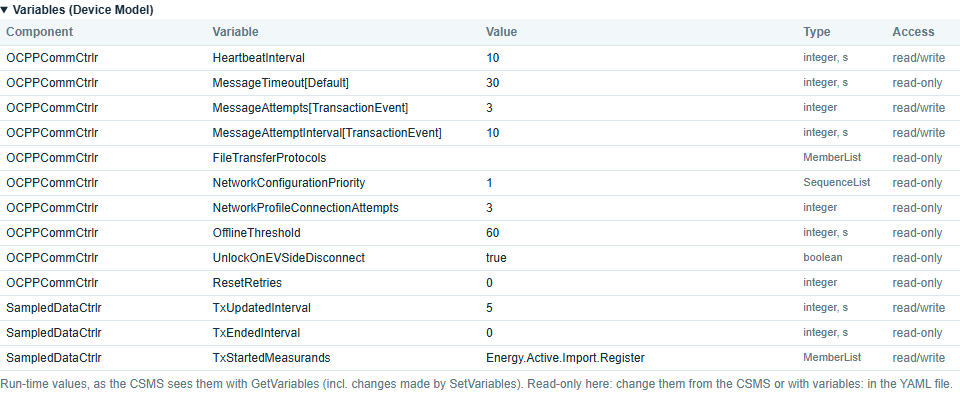
A mixed 1.6 / 2.0.1 example is configs/mixed-site.yaml.
Not supported yet: the 2.0.1 evses tree (several connectors per EVSE) and behaviors. Charger templates: see Excel and templates.
mini_csms
The built-in simple CSMS, see Mini CSMS. Off by default.
| Field | Default | Meaning |
|---|---|---|
enabled |
false |
Start the Mini CSMS WebSocket server |
host |
"127.0.0.1" |
Listen address ("0.0.0.0" for other hosts and Docker) |
port |
9000 |
Listen port |
versions |
["1.6", "2.0.1"] |
OCPP versions accepted (subprotocol negotiation) |
boot.status |
Accepted |
BootNotification answer: Accepted, Pending or Rejected |
boot.interval |
300 |
Heartbeat interval (Accepted) or retry delay (Pending / Rejected), seconds |
auth.basic |
false |
true = Security Profile 1: HTTP Basic Auth required |
auth.credentials |
[] |
{id, password} per station; with basic: true any other id or password is refused (HTTP 401). Shown masked in the web UI |
authorize.default |
Accepted |
Authorization status answered for an id tag / id token |
authorize.tags |
{} |
Per tag overrides, e.g. {"BAD": "Blocked"} (a 2.0.1-only status is answered as Invalid to 1.6) |
strict |
false |
Answer a payload that does not match the schema with CALLERROR (default: answer it and record a warning) |
call_timeout_s |
30 |
Timeout of CALLs sent to a station |
frame_log_size |
5000 |
Frames kept by the Mini CSMS's own frame log |
plan |
[] |
Scheduled CALLs: at_s, after (boot / connect), action, payload, optional charger (pattern) and ocpp_version |
Changing enabled, host or port restarts the Mini CSMS (stations reconnect); other changes apply at once (a
changed plan from the next connection). A port that cannot be bound is reported in the event log and the panel.