Excel import / export and charger templates
Large sites are easier to maintain in a spreadsheet, and many chargers of the same model are easier to add from a template. Both work from the web UI (File menu, Add charger dialog) and through the HTTP API.
Charger templates
A charger template is a set of model defaults: vendor / model, number of connectors, maximum power, supply voltage
and phases, and optionally ramps, auth_mode, config_keys, session, maintenance and similar fields. A charger
refers to a template with template:; every template field the charger does not set itself comes from the template:
chargers:
  - id: "CP-0001"
    template: jp-ac-6kw          # 6 kW, single-phase 200 V
  - id: "CP-0002"
    template: jp-ac-6kw-dual
    max_power_w: 3000            # own value wins over the template
Connection and security settings (id, csms_url, ocpp_version, password, certificates) are never part of a
template, so every template fits OCPP 1.6 and 2.0.1 chargers.
Built-in templates (AC only; DC charging is not modelled):
| Name | Model | Connectors | Max power | Supply |
|---|---|---|---|---|
jp-ac-3kw |
SIM-AC3 |
1 | 3 kW | 1 phase 200 V, 15 A (Japan) |
jp-ac-6kw |
SIM-AC6 |
1 | 6 kW | 1 phase 200 V, 30 A (Japan) |
jp-ac-6kw-dual |
SIM-AC6D |
2 | 6 kW each | 1 phase 200 V (Japan) |
eu-ac-11kw |
SIM-AC11 |
1 | 11 kW | 3 phase 230 / 400 V, 16 A |
eu-ac-22kw |
SIM-AC22 |
1 | 22 kW | 3 phase 230 / 400 V, 32 A |
When the configuration is saved, a templated charger keeps only its own overrides (values equal to the template's are left out). So a later change of the template applies to every charger that uses it.
The comparison is with the template's value: a value equal to the model default is still written when it differs
from the template (e.g. phases: 1 on eu-ac-11kw, connectors: 1 on jp-ac-6kw-dual). config_keys,
session and maintenance are compared key by key: a charger that sets one key keeps only that key, the
template's other keys still follow the template.
Deleting a user template that chargers use
If a user template file is deleted (and the templates reloaded) while chargers still refer to it, the running
chargers keep their values, but the configuration can no longer be loaded: start, config reload and Excel
import fail with charger 'CP1': unknown template 'my-wallbox' (known: ...); restore the user template file,
or remove 'template' from the charger and set its fields. Restore the file, or remove template: (and
params:) from those chargers.
User templates
User templates are YAML files in ~/.sme-ocpp-sim/templates/ (or the directory in the environment variable
SME_OCPP_SIM_TEMPLATES). A user template with the name of a built-in one replaces it. File → Device templates →
Save as device template writes the selected charger's model fields as a new user template; Reload user device
templates reads the directory again. File format:
name: my-wallbox            # default: the file name
title: My 7 kW wallbox
params: {kw: 7}             # defaults; a charger overrides them with params: {kw: 11}
model: "WB-{kw}"
max_power_w: "{kw}000"      # exactly one placeholder keeps the type: 7000
config_keys: {MeterValueSampleInterval: "60"}
Allowed keys: name, title, description, params and the template fields vendor, model, firmware,
connectors, max_power_w, voltage_v, phases, line_to_line, ramp_up_w_per_s, ramp_down_w_per_s,
auth_mode, boot_retry_s, meter_sample_interval_s, require_subprotocol, config_keys, session,
maintenance. A file with another key or with values that do not make a valid charger is skipped and reported.
Adding many chargers
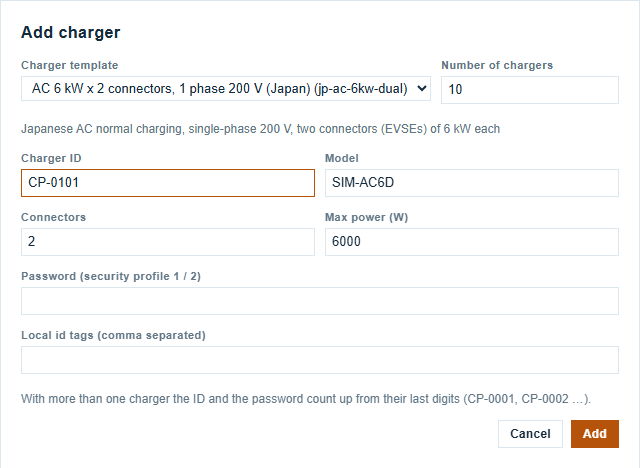
The Add charger dialog takes a template and a number of chargers. With more than one, the ID and the password
count up from their trailing digits: first ID CP-0001, count 3 → CP-0001, CP-0002, CP-0003; password
pass01 → pass01, pass02, pass03 (a password without trailing digits is the same for all). An ID without
trailing digits is a prefix (CP- → CP-1, CP-2 …). If any of the new IDs exists already, nothing is added.
Excel workbook
File → Export Excel workbook downloads the chargers as .xlsx; Import Excel workbook applies an edited one;
Download blank Excel template gives an empty workbook with the headers. Row 1 holds the column names, row 2
(starting with #) a short help; any row starting with # is ignored.
| Sheet | Rows | Columns |
|---|---|---|
chargers |
One per charger (required sheet) | id (required), template, ocpp_version, csms_url, password, vendor, model, serial, firmware, connectors, max_power_w, voltage_v, phases, line_to_line, auth_mode, id_tags (comma separated), ev_model, initial_soc, target_soc (the session fields), extra |
config_keys |
One per OCPP 1.6 configuration key | charger, key, value |
variables |
One per OCPP 2.0.1 variables entry |
charger, component, component_instance, evse, connector, variable, variable_instance, value, target, min_set, max_set, extra (definition of a user-defined variable) |
ev_models |
One per ev_models entry |
id, capacity_kwh, max_ac_kw, max_current_a, phases, min_current_a, efficiency, extra (curve, max_dc_kw) |
extra holds every other field as a YAML flow mapping, e.g. {verify_tls: false, ramp_up_w_per_s: 500}.
Rules:
- An import replaces the chargers and EV models as a whole; a missing optional sheet means none. Every other block
(
simulation,csms_defaults,mini_csms, …) stays as it is. Only chargers whose settings changed reconnect. - Blank cells are the field's default, or the template's value for a charger with a
template. The export fills every column of a charger without a template and leaves the template's columns of a templated charger empty. - Passwords are exported as
********. Importing********keeps the charger's stored password; a new charger needs its real password. - Text stays text: an ID
0123or1e5stored as a text cell is read unchanged. A cell Excel stores as a number is converted (778→"778"), so type leading zeros as text. - No formulas: exported texts are always text cells, also a text starting with
=,+,-or@(it gets Excel's quote prefix and is read back unchanged). An upload is limited to 10 MB and 5000 charger rows (50000 rows on the other sheets). - An import is all or nothing. Errors name the sheet, row and column, e.g.
chargers row 4, column 'ocpp_version': unknown OCPP version '3.0'orchargers row 6, column 'id': duplicate charger id 'CP-0001' (also row 3).