Fault injection
Fault rules make the simulator misbehave on purpose so a Modbus master (EMS, gateway, SCADA) can be tested against timeouts, exceptions, broken frames and stale values. Rules are runtime state: they are managed in the web UI (bottom pane, Faults tab) or over the REST API and are not part of the YAML configuration. They survive a configuration reload, but not a restart.
Rule fields
| Field | Default | Meaning |
|---|---|---|
id |
generated (f1, f2, ...) |
Rule id used by the API and shown in the traffic panel |
name |
- | Free text |
enabled |
true |
|
listener |
any | Listener id |
unit |
any | Unit id of the request |
function_codes |
any | List of function codes, e.g. [3, 4] |
address_start / address_end |
any | Inclusive range; matches when it overlaps the request's start..start+quantity-1 (FC 23: read or write range) |
action |
- | See below |
params |
{} |
Action parameters |
probability |
1 |
0-1, chance that a matching request triggers the rule |
every_n |
- | Trigger only on every N-th matching request |
remaining |
- | Trigger this many times, then the rule disables itself |
Rules are evaluated in list order for every request; the first rule that fires wins. A rule
whose filters match but whose every_n / probability gate says "not this time" lets evaluation
continue with the next rule. Each firing is recorded in the trace event (fault: {rule, action}),
so the Traffic panel marks faulted frames with a lightning sign.
Actions
| Action | Params | Effect |
|---|---|---|
exception |
code: 01-06, 08, 0A, 0B (number or hex string, default 04) |
Answer with that exception; the request is not executed |
delay |
ms, or min_ms + max_ms (random) |
Delay the response; other connections are not affected |
no_response |
- | Drop the request (not executed, no answer) |
disconnect |
- | TCP / RTU over TCP: close the connection after receiving the request. Serial RTU: same as no_response. UDP: no connection to close, the request stays unanswered |
corrupt_crc |
- | RTU / RTU over TCP / serial RTU: invert the two CRC bytes. Serial ASCII: invert the LRC. Not applied on Modbus TCP / UDP |
truncate |
bytes (default 3) |
Send only the first N bytes of the response frame |
wrong_transaction_id |
- | Modbus TCP / UDP only: answer with transaction id + 1 |
wrong_unit_id |
unit (default: request unit + 1) |
Answer with another unit id |
busy |
seconds (default 10) |
From the first trigger on, answer exception 06 for that many seconds, then disable the rule |
freeze |
- | Point values of the matched unit (unit / listener filters) stop updating from behaviors; Modbus keeps answering and writes still work |
refuse_connections |
- | Listener level (listener filter): new TCP connections are closed immediately. On a udp listener every datagram is dropped while the rule is active (trace error "datagram refused (fault)") |
Web UI
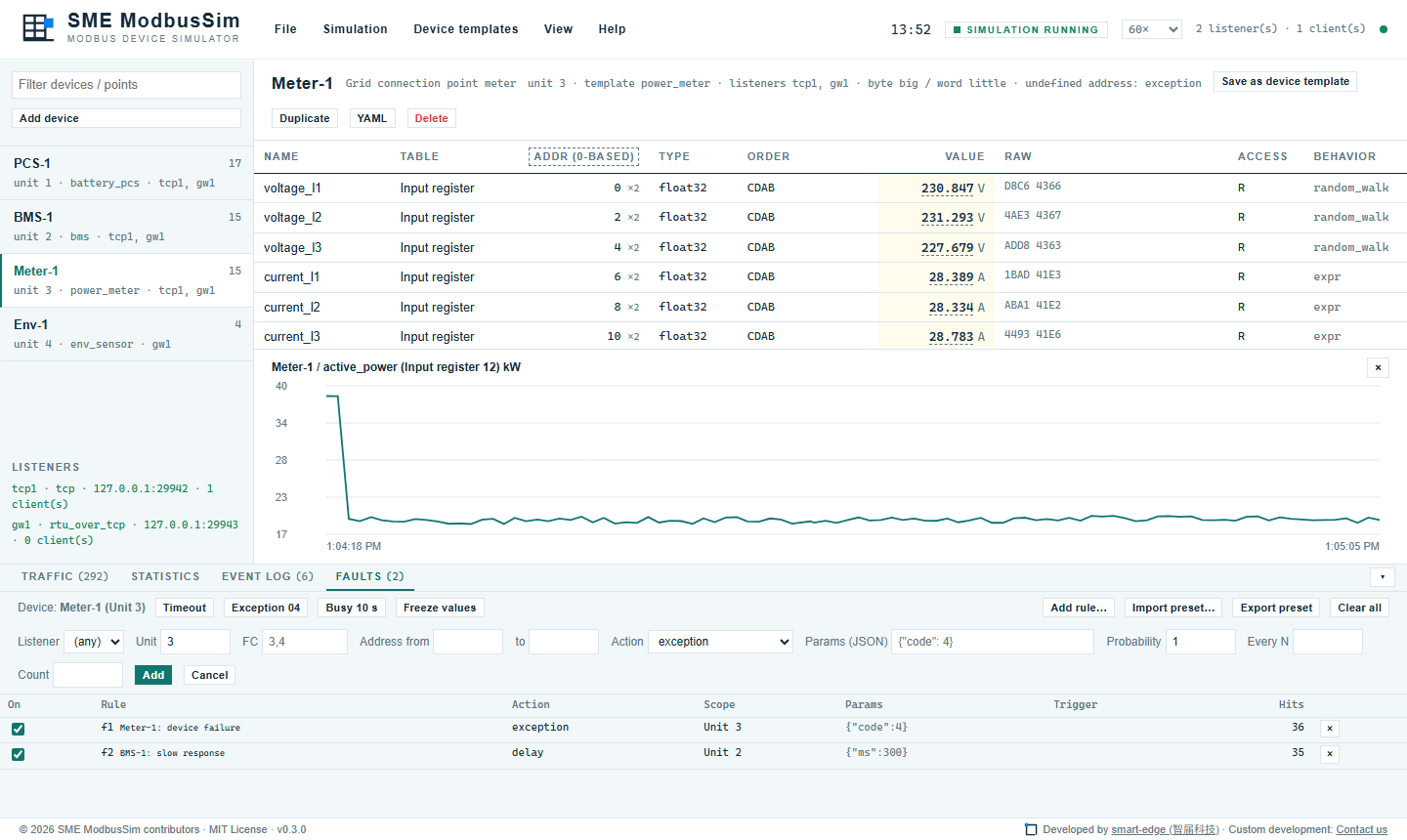
The Faults tab lists the rules with an enable switch, the trigger count and a delete
button. Quick buttons act on the device selected in the side bar: Timeout (no_response),
Exception 04, Busy 10 s and Freeze values. Add rule... opens a form for any
rule; Import preset... / Export preset load and save JSON files.
Presets
A preset is a YAML or JSON list of rules (or a mapping with a faults: list). Keep presets as
separate files next to your configuration, for example faults/meter-flaky.yaml:
- {id: slow, action: delay, params: {min_ms: 200, max_ms: 1500}, unit: 3, probability: 0.3}
- {id: crc, action: corrupt_crc, listener: gw1, every_n: 10}
- {action: exception, params: {code: "02"}, function_codes: [16], address_start: 100, address_end: 199}
Load it from a CI script:
curl -X POST --data-binary @faults/meter-flaky.yaml http://127.0.0.1:8081/api/faults/preset
# ... run the tests against the simulator ...
curl -X POST http://127.0.0.1:8081/api/faults/clear
POST /api/faults/preset replaces all rules (add ?replace=false to append) and is
all-or-nothing: if one rule is invalid, nothing changes. GET /api/faults/export returns the
current rules as faults.json, ready to be loaded again. See HTTP API.